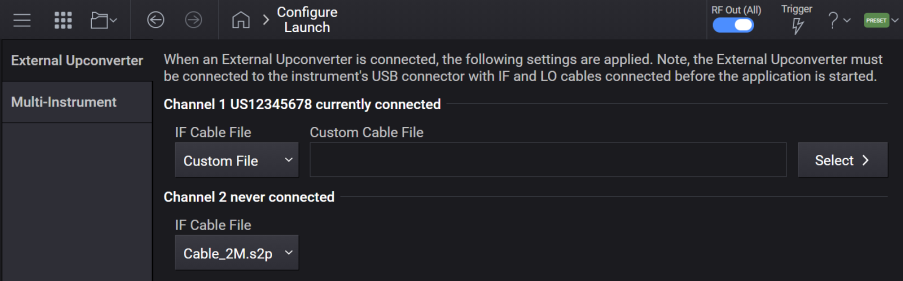
For M9484C with Option AL2.
Type of Supported Upconverters
LO1 and LO2 Connectors For Use With V3080A
RF Channels Connectivity For V3080A
Integrated Operation with an Upconverter
Automatic Upconverter Detection on Startup
GUI and SCPI Settings to Configure an Upconverter
Controlled: Requires a USB connection for power and communication between the source and upconverter.
You can use the following external upconverter models with your signal generator.
| Upconverter Model | Upconverter Type | Required LO |
| Keysight Technologies V3080A | Controlled | Auxiliary LO @ 9.6 GHz |
All upconverters utilize the RF and appropriate LO outputs from the source for the IF and LO inputs of the upconverter, respectively.
The V3080A upconverter requires the use of the Auxiliary LO operating at 9.6 GHz. This LO is present on
The instrument contains two connectors labeled LO1 and LO2 for providing an Auxiliary Local Oscillator output. Each connector can be off, or provide a CW frequency of 2.4 GHz, 4.8 GHz, 9.6 GHz, or 19.2 GHz. If you are not using the output, place the setting to off to minimize emissions.
When using the V3080A Frequency Extender, the Auxiliary LO connector(s) are used for interfacing with V3080A. With a V3080A connected, the auxiliary LO port is set to 9.6 GHz and is not changeable.
When one V3080A is connected to the instrument, the LO1 will be used.
You can connect one or two V3080As to a 2-Channel M9484C VXG.
If you want to connect a single V3080A to a 2-Channel M9484C, then you must connect it to Channel 1 of M9484C.
When an upconverter is enabled (in use), it is integrated into the operation of a channel in the following ways:
The channel Frequency and Power settings refer to the output of the upconverter instead of the signal source.
"UPCONVERTER" is shown below the RF Output block on the channel diagram, indicating an upconverter is enabled.

Limits appropriate for the enabled upconverter are used for related settings:
RF Output Frequency limits and min / max are adjusted based on model and sideband selection.
IF Frequency limits and min / max are adjusted based on model and optioned frequency limits.
IF and LO frequency and power are automatically controlled.
On start-up, an instrument automatically detects if a supported, controlled upconverter is connected, and attempts to enable it. This process performs LO and IF power checks (as well as communication checks) to determine if the upconverter is fully connected and operational. If this check succeeds, the upconverter is enabled on the connected channel, otherwise errors are shown in the Message queue.
For M9484C, in the event of errors, the instrument needs to be powered down to resolve the issue and then powered up to attempt to enable the upconverter. All external upconverter configuration settings are accessible via the Configure Launch option in the System Menu.
The model of the upconverter to be used on the specified channel. Supported upconverter options:
NONE: No upconverter selected
K80A: Keysight Technologies V3080A controlled upconverter
| SCPI Command |
:ROUTe:EUConverter<channel>:MODel NONE|K80A :ROUTe:EUConverter<channel>:MODel? |
| SCPI Example |
ROUT:EUC1:MOD K80A ROUT:EUC1:MOD? |
| Notes |
For M9484C: With or without option AL2, the upconverter model can only be queried. When no upconverter is connected, NONE is returned, otherwise K80A is returned, for the supported model V3080A. Attempting to change upconverter model raises the error "Feature not supported; Setting upconverter model unavailable on this instrument." |
| Dependencies | Upconverter Model can only be changed if the upconverter is not enabled. |
| Preset | This is unaffected by a Preset but is set to NONE on a "Restore System Settings to Default Values." |
| Range | None|V3080A |
| State Saved | Persistent, survives preset and power cycle but not saved in the instrument state. |
| Initial S/W Revision | A.18.00 |
Query only.
Returns the serial number of the upconverter, when a Keysight Technologies upconverter is enabled.
| SCPI Command |
:ROUTe:EUConverter<channel>:SNUMber? |
| SCPI Example |
ROUT:EUC:SNUM? |
| Notes | If no Keysight upconverter is enabled, returns "". |
| Preset | "" |
| State Saved | No |
| Initial S/W Revision | A.18.00 |
The characteristics of the cable used to provide the IF signal to the upconverter can be specified to improve the IF power accuracy into the upconverter.
If you are using the 1 Meter, 2 Meter, or 3 Meter cable purchased from Keysight Technologies, the .s2p characteristics are included in the instrument's software.
If you are using a cable obtained elsewhere, select Custom and provide the path to the .s2p file in the Custom IF Cable File setting.
The IF Cable loss data affects the IF power into and the RF power out of the upconverter.
| SCPI Command |
:ROUTe:EUConverter<channel>:IFCable IDEal|C_1M|C_2M|C_3M|CUSTom :ROUTe:EUConverter<channel>:IFCable? |
| SCPI Example |
ROUT:EUC:IFC C_3M ROUT:EUC:IFC? |
| Notes |
For M9484C without Option AL2: Attempting to change EUC raises error 703,"Feature not supported; IF Cable unavailable, AL2 is required." Selecting IDEal results in using 0 dB for the cable loss. For the V3080A: C_1M|C_2M|C_3M|IDEal|CUSTom can be selected. When a V3080A model is selected and the IF Cable will be updated to C_2M. If a V3080A is detected and enabled on start-up and IF Cable is IDEal, it will be updated to C_2M. For all other upconverters: Only IDEal|CUSTom can be selected. Changing the upconverter model will update this to IDEal (except as noted above). Changing the IF Cable can affect the IF power into and RF power out of the upconverter. |
| Preset |
For M9484C: C_2M This is unaffected by a Preset but is set to default value on a "Restore System Settings to Default Values." |
| Range | Ideal|Cable_1M.s2p|Cable_2M.s2p|Cable_3M.s2p|Custom File |
| State Saved | Persistent, survives preset and power cycle but not saved in the instrument state. |
| Initial S/W Revision | A.11.00 |
| Modified at S/W Revision | A.18.00 - Added IDEal option |
The .s2p file for the custom IF cable must be uploaded to the instrument prior to specifying the cable for use via the following command (as a CUSTom cable).
Custom Cable Files should be stored in the ExternalUpconverter directory of the Corrections Folder.
The following table shows few custom cable file path examples and which folders are selected.
| SCPI command example | Folder |
|---|---|
ROUT:EUC:IFC:CUST "abc.s2p"
|
<Documents>\Keysight\PathWave\SignalGenerator\Corrections\ExternalUpconverter
|
ROUT:EUC:IFC:CUST "myDir\abc.s2p"
|
<Documents>\Keysight\PathWave\SignalGenerator\Corrections\ExternalUpconverter\myDir
|
ROUT:EUC:IFC:CUST "C:\wfm\abc.s2p"
|
C:\wfm\
|
| SCPI Command |
:ROUTe:EUConverter<channel>:IFCable:CUSTom "<path>\<file_name>.s2p" :ROUTe:EUConverter<channel>:IFCable:CUSTom? |
| SCPI Example |
ROUT:EUC:IFC:CUST "<Documents>\Keysight\PathWave\SignalGenerator\Corrections\ExternalUpconverter\custom_cable_file.s2p" ROUT:EUC:IFC:CUST? |
| Notes | For M9484C without option AL2:Attempting to change raises error 703,"Feature not supported; Custom IF Cable File unavailable, AL2 is required." Attempting to change to a filetype that is not .s2p raises error 629, "File format invalid:Invalid Custom IF Cable File selected." |
| Dependencies | Applies only when Upconverter IF Cable File is CUSTom. |
| Preset | This is unaffected by a Preset but is set to an empty string on a "Restore System Settings to Default Values." |
| State Saved | Persistent, survives preset and power cycle but not saved in the instrument state. |
| Initial S/W Revision | A.11.00 |